From Prompt Metadata Hacks to Native Voice Agents in Azure AI Foundry (Try Both Live)
In Part 1: From Voice to Microsoft Fabric and Back, I shared why I built Drive-Thru Z: back at 15 I thought the fast-food Drive-Thru crew were the cool kids, and after 20 years of never actually visiting a drive-thru, automating one with AI felt like the ultimate side quest.
Once Azure AI Foundry shipped native Voice Agents (kind="voice", VoiceAgents=V1Preview), I realized our original PromptAgentDefinition setup was relying on early workarounds. Instead of overwriting the main branch deployment in drive-thru-voice-agent-demo, I upgraded the app on a feature branch and deployed both architectures live side-by-side on Azure Container Apps!
Try Both Architectures Live
Now the fun part, let’s see if we can break this! Open both deployments in adjacent tabs (backed by the exact same menu and Fabric SQL database) and compare them directly:
- New Native Voice Agent (
kind="voice"): drivethruagent.sidequests.blog — you can also hit/api/architectureto inspect the live metadata JSON (agent_kind: "voice",session_update_required: false,token_in_query_string: false). - Legacy Prompt Agent (
kind="prompt"): drivethruagent-legacy.sidequests.blog
Try interrupting the assistant mid-sentence (barge-in), switching between English and Dutch ("Doe maar een Classic Cheeseburger, no pickles"), or jumping categories to watch the basket sync.
Please note: Both Container Apps scale with
minReplicas: 0to keep side-project costs near zero, so the first page load after idle time takes a few seconds to cold-start.
Architecture Comparison at a Glance
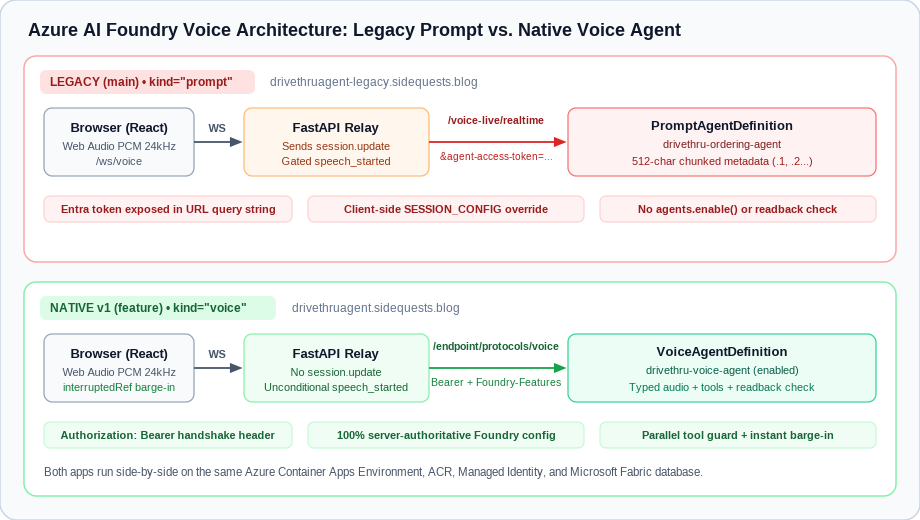
To keep things honest: the legacy main branch already configured azure_deep_noise_suppression and azure_semantic_vad. The real problem was how we had to wire it — stuffing voice JSON into 512-character metadata chunks on a text prompt agent and re-sending session.update on every connect.
| Area | Legacy (main) |
Native Voice Agent (feat/voice-agent-architecture) |
|---|---|---|
| Agent definition | PromptAgentDefinition (kind="prompt") |
Native VoiceAgentDefinition (kind="voice") |
| Voice & audio config | 512-char chunked metadata (microsoft.voice-live.configuration.N) |
Typed audio.input / audio.output + readback validation |
| Activation | create_version() only |
create_version() + agents.enable() + get_version() check |
| WebSocket & auth | /voice-live/realtime with &agent-access-token=<token> |
/endpoint/protocols/voice with Authorization: Bearer header |
| Session setup | Client sends session.update (SESSION_CONFIG) |
100% server-authoritative (SESSION_CONFIG = {}) |
| Barge-in cut-off | Gated speech_started on agent_speaking / response_active |
Unconditional speech_started + Web Audio teardown |
Five Concrete Architectural Changes
1. From 512-Char Metadata Chunks to VoiceAgentDefinition
On main, Foundry capped each agent metadata entry at 512 characters, forcing chunk_config() in src/agents/create_voice_agent.py to slice VOICE_LIVE_CONFIG across numbered keys (microsoft.voice-live.configuration.1, .2, …).
In the new version, VoiceAgentDefinition (kind="voice", model_type="managed") stores audio formats, azure-speech transcription, azure_deep_noise_suppression, azure_semantic_vad, DragonHD voice output, and tools natively. We also call agents.enable() and run validate_voice_agent_definition() against get_version() — which immediately caught that Foundry normalizes audio.output.voice + voice_type into {"type": voice_type, "name": voice} on readback!
2. Moving Entra Tokens Out of Query Strings
In main (src/backend/config.py), build_ws_url() appended &agent-access-token={access_token} directly to the /voice-live/realtime URL, risking token exposure in proxy or trace logs. Voice Agent v1 moves auth cleanly into handshake headers against /endpoint/protocols/voice:
def build_voice_agent_headers(access_token: str) -> dict[str, str]:
    return {
        "Authorization": f"Bearer {access_token}",
        "Foundry-Features": "VoiceAgents=V1Preview",
        "x-ms-client-request-id": str(uuid.uuid4()),
    }
3. Deleting session.update Overrides
On main, relay.py had to emit session.update right after connecting, splitting session state between Foundry and Python. With kind="voice", Foundry is server-authoritative (SESSION_CONFIG = {}), so relay.py simply opens the socket and streams audio.
4. Voice Agent v1 Events and Parallel Tool Deferral
The v1 protocol introduces session.created, conversation.created, and response.output_audio.delta events. In src/backend/event_handlers.py, state.pending_calls tracks parallel tool invocations and _trigger_response_create() waits until not state.response_active and not state.pending_calls before sending response.create.
5. Real-Time Barge-In: Faster-Than-Real-Time Audio
This was the biggest UX surprise during testing! Azure streams synthesized audio deltas much faster than real-time — a 5-second reply finishes arriving in ~300 ms, so Foundry sends response.done almost immediately while the browser still has seconds of AudioBufferSourceNode chunks queued.
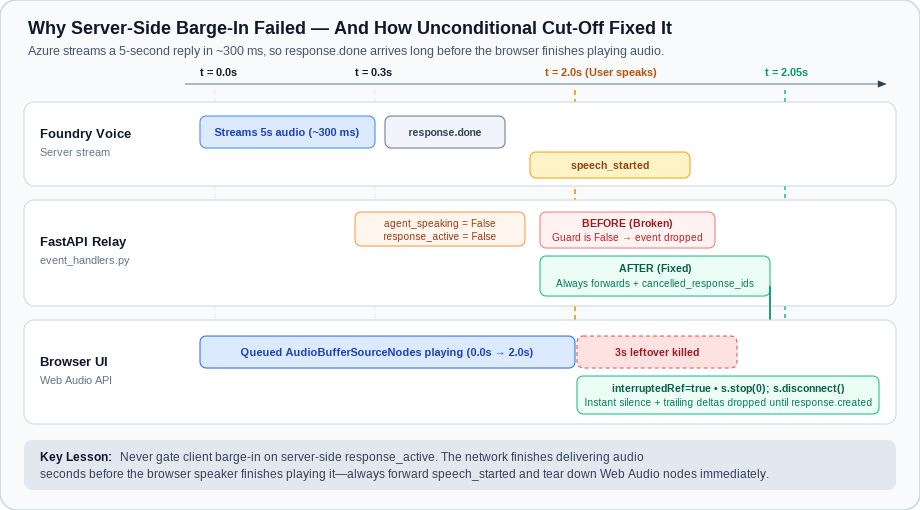
Because main gated input_audio_buffer.speech_started behind if state.agent_speaking or state.response_active:, interrupting 2 seconds into a reply silently dropped speech_started and let old audio keep playing. Forwarding speech_started unconditionally, tracking cancelled_response_ids in Python, and tearing down activeSourcesRef.current in src/frontend/src/App.tsx cuts off playback instantly:
} else if (type === "input_audio_buffer.speech_started") {
  setStatus("listening");
  interruptedRef.current = true;
  playbackTimeRef.current = 0;
  activeSourcesRef.current.forEach((s) => {
    try { s.stop(0); s.disconnect(); } catch {}
  });
  activeSourcesRef.current = [];
}
The Gotcha: Immutable kind and Side-by-Side Bicep
When I tried creating a new version of drivethru-ordering-agent with VoiceAgentDefinition, Foundry threw:
400 Bad Request: Agent kind mismatch for 'drivethru-ordering-agent'. Existing: prompt, New: voice.An agent’s kind is immutable once created. Registering drivethru-voice-agent as a separate agent unlocked side-by-side testing, and infra/side-by-side.bicep deploys ca-web-voice-agent onto our existing Container Apps Environment, ACR, and Managed Identity with zero duplicate cluster cost:
resource containerAppsEnvironment 'Microsoft.App/managedEnvironments@2023-05-01' existing = {
  name: '<aca-env>'
}
resource managedIdentity 'Microsoft.ManagedIdentity/userAssignedIdentities@2023-01-31' existing = {
  name: '<managed-identity>'
}

resource app 'Microsoft.App/containerApps@2023-05-01' = {
  name: 'ca-web-voice-agent'
  properties: { managedEnvironmentId: containerAppsEnvironment.id }
}
Binding drivethruagent.sidequests.blog and drivethruagent-legacy.sidequests.blog via Azure Container Apps managed certificates gives readers a permanent side-by-side playground 💚.
What’s next?
I strongly advise migrating off metadata chunking if you are building on VoiceLive: VoiceAgentDefinition makes your relay thinner, keeps tokens in headers, and plays nicely with instant barge-in. Next, I plan to retire the legacy app once folks have had a chance to compare both and add session duration caps on /ws/voice.
If you haven’t seen how the menu board and Microsoft Fabric SQL database work behind the scenes, check out Part 1: From Voice to Microsoft Fabric and Back. Agree or miss something?! Let me know!
References
- Drive-Thru Z Source Code: github.com/ArthurSteijn/drive-thru-voice-agent-demo
- Microsoft Azure AI Foundry Voice Agent Reference: github.com/microsoft/voice-agent
- Microsoft Learn — Voice Live API overview: learn.microsoft.com/en-us/azure/ai-services/speech-service/voice-live
- Microsoft Learn — Custom domains & managed certificates in Container Apps: learn.microsoft.com/en-us/azure/container-apps/custom-domains-managed-certificates
- Live Demos: drivethruagent.sidequests.blog (
kind="voice") & drivethruagent-legacy.sidequests.blog (kind="prompt") - Part 1 of this Series: From Voice to Microsoft Fabric and Back: Building a Real-Time Drive-Thru AI Agent