From Voice to Microsoft Fabric and Back: Building a Real-Time Drive-Thru AI Agent
When I was 15, I worked at a fast-food restaurant. Back then, the Drive-Thru team were the cool kids — headsets on, juggling cars, screen orders, and kitchen timing while the rest of us worked the counter. The funny thing is that I haven’t actually been through a drive-thru since getting my driver’s license 20 years ago, yet that workflow always stuck with me as an awesome real-world case to automate with a voice agent!
That side quest became Drive-Thru Z, an interactive ordering app you can try live at drivethruagent.sidequests.blog or inspect in drive-thru-voice-agent-demo. In this post, I will walk through the end-to-end flow: from browser mic capture through FastAPI and Azure AI Foundry to Microsoft Fabric SQL, and back to your speakers and on-screen basket.
Series Note: Want to see how I upgraded the voice layer from prompt metadata hacks to native
kind="voice"Voice Agents and fixed real-time barge-in? Read Part 2: From Prompt Metadata Hacks to Native Voice Agents in Azure AI Foundry (Try Both Live).
End-to-End Architecture
In my opinion, the browser should never talk directly to Azure AI Foundry or Microsoft Fabric. Keeping a thin FastAPI relay in the middle keeps Entra ID credentials off the client, runs SQL and analytics tools server-side, and pushes instant UI updates back over the same WebSocket.
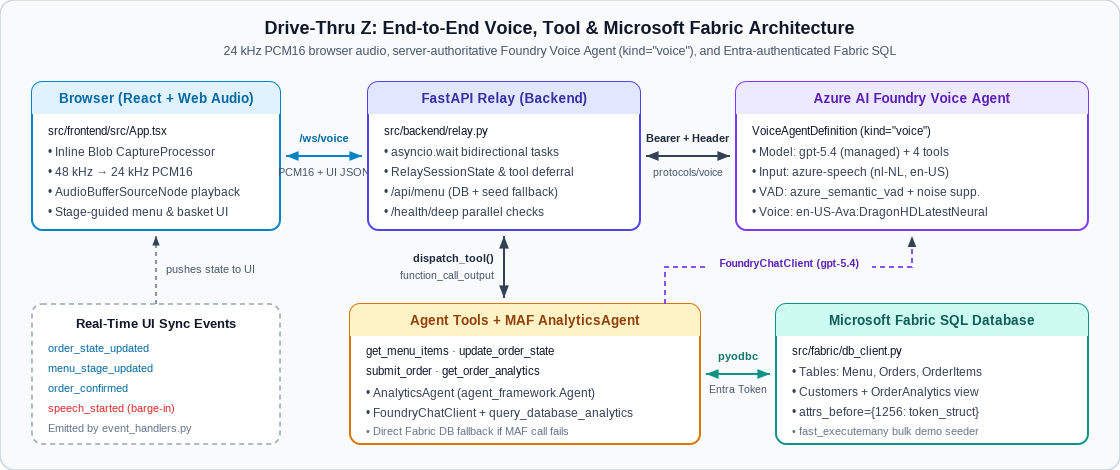
Here is how the pieces fit together:
- Browser (
src/frontend/src/App.tsx): Captures 48 kHz mic audio via an inlineAudioWorklet, resamples to 24 kHz PCM16, streams frames to/ws/voice, and renders a hands-free menu board and basket. - FastAPI Relay (
src/backend/relay.py&event_handlers.py): Bridges/ws/voiceto Foundry (protocols/voice), managesRelaySessionState, dispatches tools, and emits UI events (order_state_updated,menu_stage_updated,order_confirmed). - Foundry Voice Agent (
src/agents/create_voice_agent.py): Runs a server-sideVoiceAgentDefinition(kind="voice",gpt-5.4, bilingualnl-NL,en-USspeech input,azure_deep_noise_suppression,azure_semantic_vad, anden-US-Ava:DragonHDLatestNeural). - Agent Tools & MAF
AnalyticsAgent(src/agent_tools/,src/agents/analytics_agent.py): Exposesget_menu_items,update_order_state,submit_order, andget_order_analytics(delegated to a Microsoft Agent FrameworkAgent). - Microsoft Fabric SQL (
src/fabric/db_client.py&schema-setup.sql): StoresMenu,Orders,OrderItems, andCustomers, plus theOrderAnalyticsview, using passwordless Entra ID tokens.
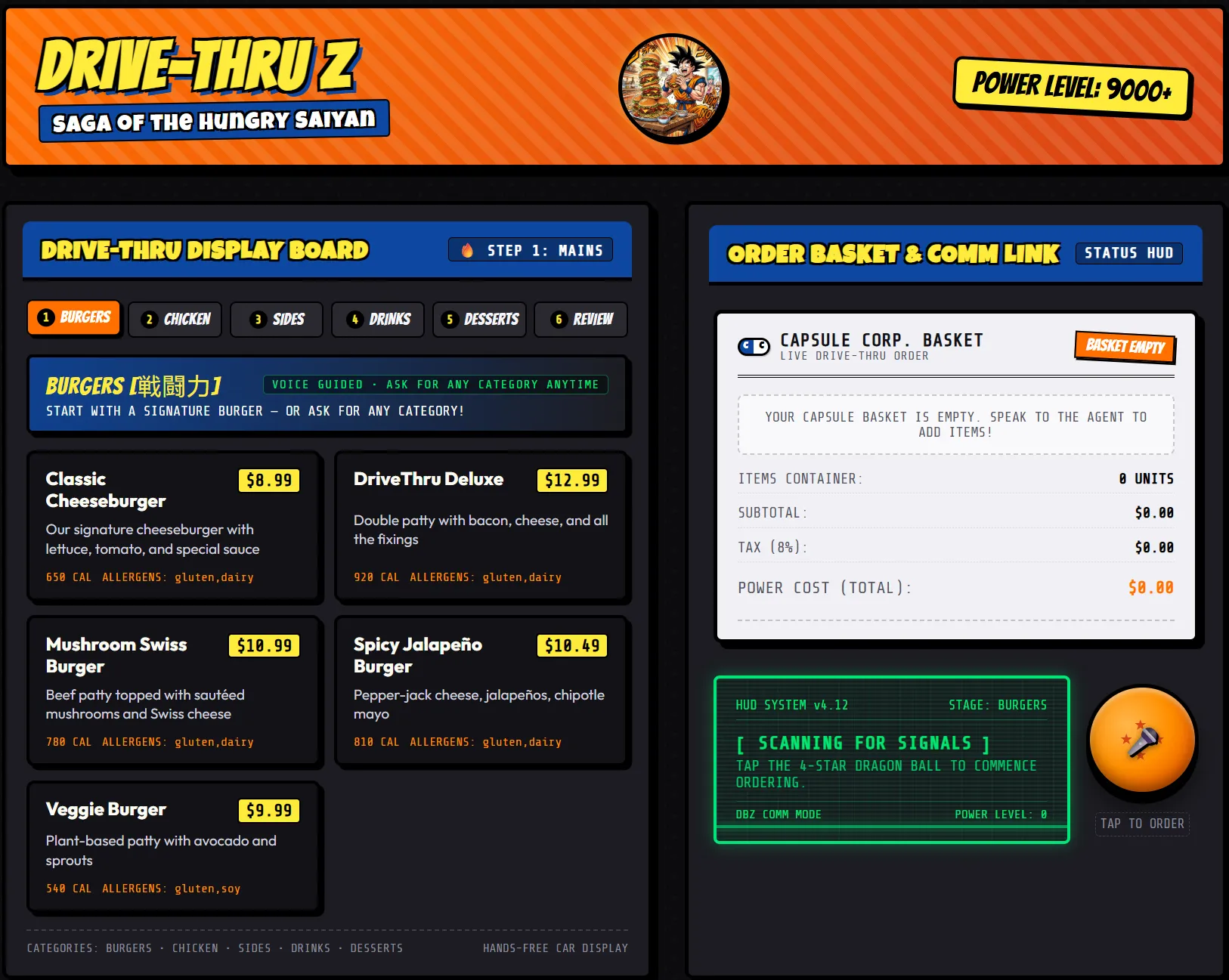
Browser Audio and Hands-Free UI Sync
A real drive-thru customer cannot scroll a touchscreen while holding the steering wheel. In App.tsx, STAGE_CONFIGS splits the menu into six stages (burgers, chicken, sides, drinks, desserts, review), and the agent drives the active stage and basket via tool results pushed over /ws/voice.
For audio capture, serving a static processor.js file often trips over cache paths or MIME headers across hosts. Instead, App.tsx embeds CAPTURE_PROCESSOR_CODE as a string and loads it into AudioContext.audioWorklet via a short-lived Blob URL, resamples 48 kHz frames down to 24 kHz PCM16, and queues incoming AudioBufferSourceNode playback chunks in activeSourcesRef.current.
FastAPI Relay and Tool Deferral
Inside src/backend/relay.py, /ws/voice opens an upstream WebSocket to Foundry using DefaultAzureCredential and runs receive_from_browser() and receive_from_voicelive() with asyncio.wait(..., return_when=asyncio.FIRST_COMPLETED).
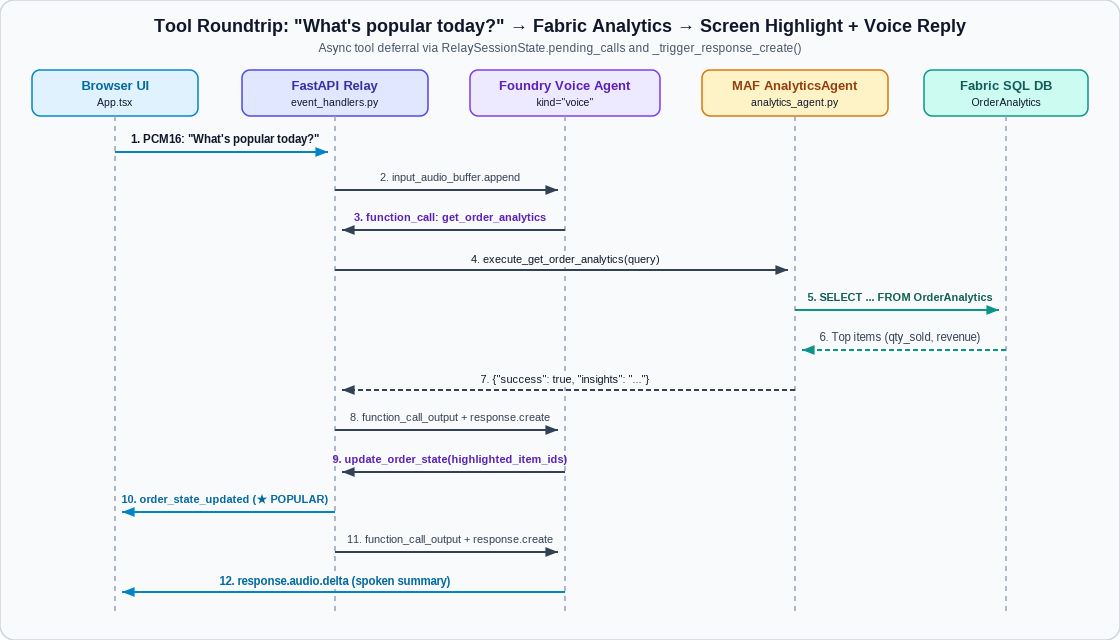
The tricky part is parallel tool calling. If you fire response.create blindly after every function_call_output, you collide with an active response turn or cut off sibling tool calls. In src/backend/event_handlers.py, state.pending_calls tracks in-flight call_ids and _trigger_response_create() waits until both the turn and all pending tools are clear:
async def _trigger_response_create(
    state: RelaySessionState,
    send_to_voicelive: Callable[[str], Awaitable[None]],
) -> None:
    if not state.response_active and not state.pending_calls and state.has_unresponded_tool_outputs:
        state.has_unresponded_tool_outputs = False
        logger.info("Triggering response.create after tool execution")
        try:
            await send_to_voicelive(json.dumps({"type": "response.create"}))
        except Exception as e:
            logger.warning("Failed to send response.create: %s", e)
Right after handle_function_call runs, event_handlers.py also forwards order_state_updated, menu_stage_updated, or order_confirmed to the browser so the screen flips the moment the tool finishes.
Passwordless Microsoft Fabric SQL
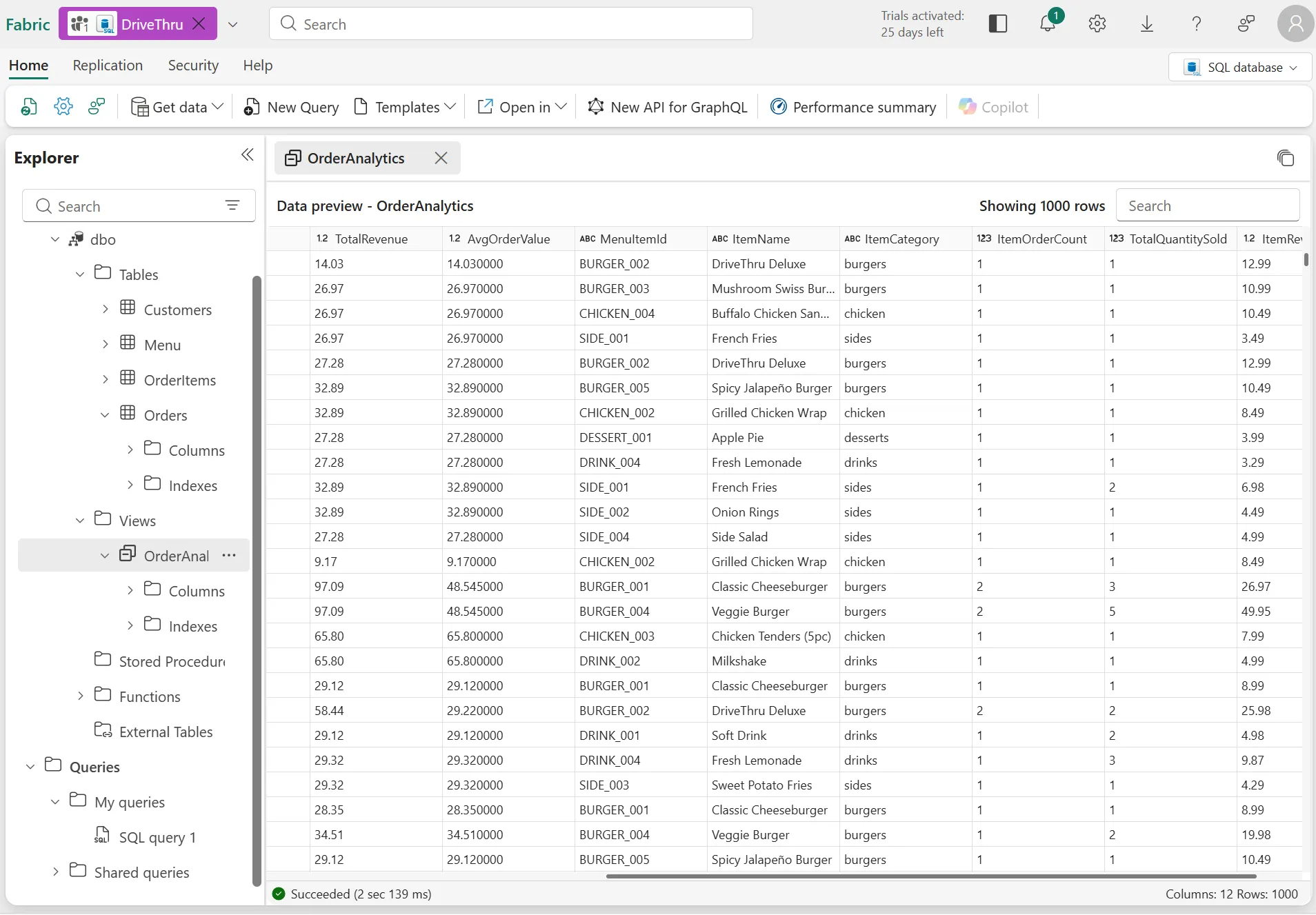
I chose Microsoft Fabric SQL Database because it handles live transactional inserts (Orders, OrderItems) and feeds the OrderAnalytics view (src/fabric/schema-setup.sql) in one place without extra ETL plumbing. In platform/fabric/setup_fabric.py, provisioning the workspace, SQL DB, and schema-setup.sql batches is fully scripted against the Fabric REST API.
Please note:
OrderAnalyticsfilters onOrderStatus IN ('completed', 'preparing', 'ready'), whereassubmit_orderinserts new voice orders as'confirmed'. Runpython -m src.fabric.seed_demo_data --reset --yes(fast_executemany = True) after schema setup so"What's popular today?"has historical sales data right away!
I would always recommend Managed Identity over SQL passwords or mixed Authentication= connection-string flags that behave differently locally vs. in Linux containers. In src/fabric/db_client.py, FabricDBClient._get_connection() grabs an Entra token for https://database.windows.net/.default, packs it for SQL_COPT_SS_ACCESS_TOKEN (1256), and strips conflicting Authentication= clauses:
cred = DefaultAzureCredential()
db_token = cred.get_token("https://database.windows.net/.default")
token_bytes = db_token.token.encode("utf-16le")
token_struct = struct.pack(f"<I{len(token_bytes)}s", len(token_bytes), token_bytes)
conn_params["attrs_before"] = {1256: token_struct}

for opt in (";Authentication=ActiveDirectoryInteractive", ";Authentication=ActiveDirectoryMsi"):
    conn_str = conn_str.replace(opt, "")
return pyodbc.connect(conn_str, **conn_params)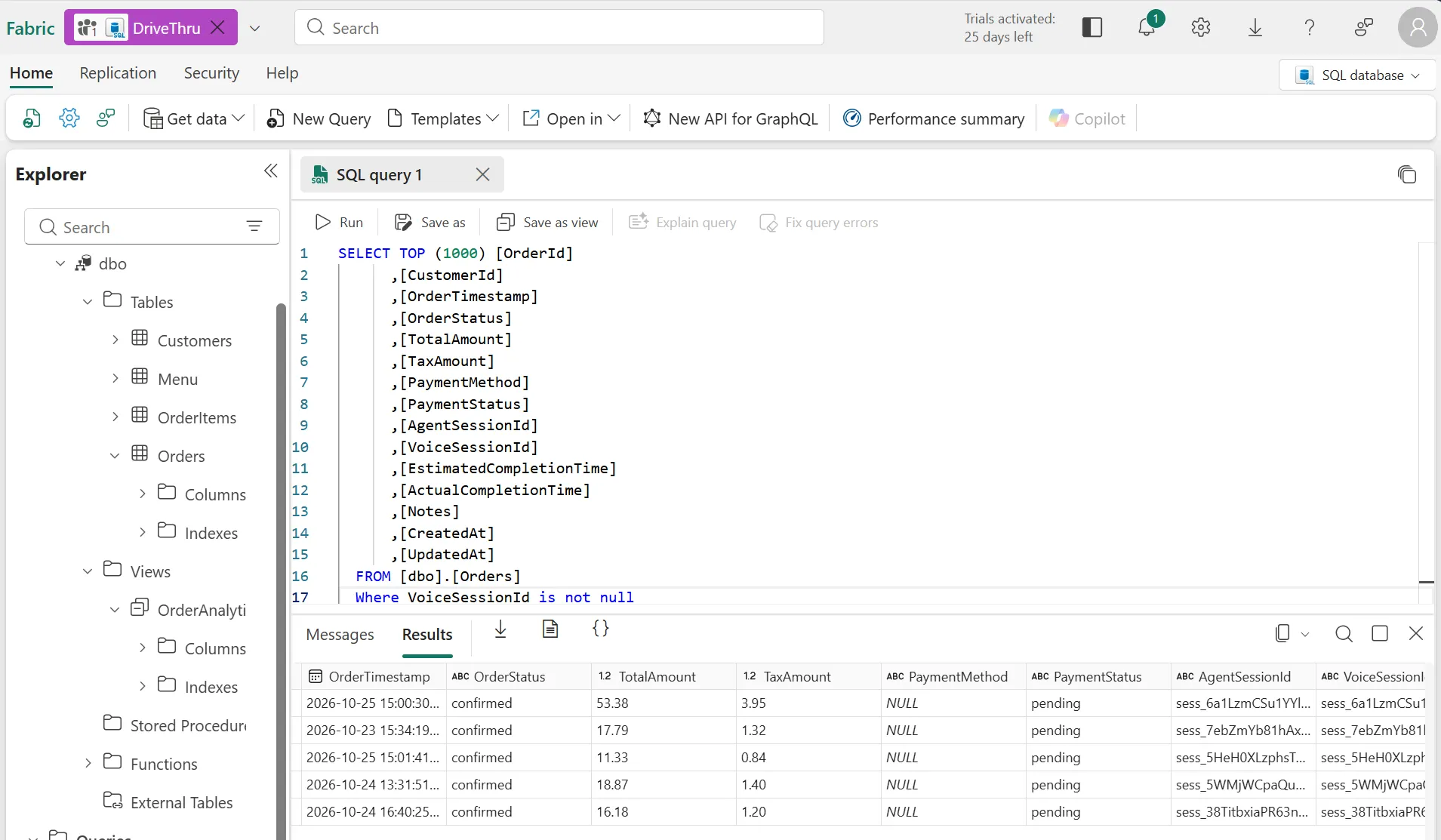
The Return Trip: MAF AnalyticsAgent
Rather than cramming SQL schemas into the voice agent’s prompt, get_order_analytics in src/agent_tools/analytics_tools.py accepts one natural-language query and delegates to AnalyticsAgent (src/agents/analytics_agent.py), built with Microsoft Agent Framework (agent_framework.Agent + FoundryChatClient) and a single @tool:
@tool
def query_database_analytics(
    metric: Annotated[str, "One of: 'popular_items', 'order_count', 'revenue', 'average_order_value'."],
    time_period: Annotated[str, "One of: 'today', 'week', 'month'."] = "today",
) -> str:
    """Query historical sales, orders, revenue, and popular items from Fabric SQL."""
    result = FabricDBClient().get_order_analytics(metric=metric, time_period=time_period)
    return json.dumps(result)
Two small safeguards keep this smooth in production: execute_get_order_analytics() runs asyncio.run(agent.get_insights(query)) inside a ThreadPoolExecutor so it never collides with FastAPI’s event loop, and if FoundryChatClient fails it falls back directly to FabricDBClient().get_order_analytics("popular_items", "today"). Once insights return, the voice agent passes highlighted_item_ids to update_order_state so the top sellers light up on screen while it speaks!
Deep Health Checks and Gotchas
When Fabric SQL capacity is paused or RBAC isn’t ready yet, silent failures ruin live demos. A few guardrails from src/backend/diagnostics.py and relay.py saved me a lot of debugging:
- Menu fallback: If
FABRIC_CONNECTION_STRINGis missing or the DB throws,/api/menuandget_menu_itemsfall back toMENU_SEED(src/fabric/demo_data.py). - Parallel
/health/deep:run_deep_diagnostics()checks Fabric SQL (SELECT COUNT(*) FROM Menu), Foundry auth, andFoundryChatClientconcurrently viaasyncio.gather, returning HTTP200or503with per-component latencies. - Container & RBAC checklist: Your container needs
msodbcsql18forpyodbc, and your Managed Identity needs permissions for bothhttps://ai.azure.com/.defaultandhttps://database.windows.net/.default.
What’s next?
This setup already powers a smooth end-to-end voice loop 💚. Next up, I want to add per-session timeouts and rate limits on /ws/voice for public demos, and look at syncing live Fabric updates over OneLake for broader reporting.
If you want to see how the voice layer evolved from kind="prompt" metadata chunks to native kind="voice" agents (and try both live!), check out Part 2: From Prompt Metadata Hacks to Native Voice Agents in Azure AI Foundry (Try Both Live).
Agree or miss something?! Let me know!
References
- Drive-Thru Z Source Code: github.com/ArthurSteijn/drive-thru-voice-agent-demo
- Microsoft Azure AI Foundry Voice Agent Reference: github.com/microsoft/voice-agent
- Microsoft Learn — SQL database in Microsoft Fabric: learn.microsoft.com/en-us/fabric/database/sql/overview
- Microsoft Learn — Voice Live API overview: learn.microsoft.com/en-us/azure/ai-services/speech-service/voice-live
- Live Demo (Native Voice Agent): drivethruagent.sidequests.blog
- Part 2 of this Series: From Prompt Metadata Hacks to Native Voice Agents in Azure AI Foundry (Try Both Live)